
Monday morning someone asks what is still open. The honest answer is a search of an inbox, sorted by memory. That is the moment a ticket system starts to earn its place.
Until that is true, a shared inbox is a reasonable tool. Company size is a weak signal. A five-person team with two people answering customers already has the problem. A fifty-person firm with one owner, and a mailbox they actually empty, does not.
The check uses your own week: how many people touch the same requests, how much mail and how many calls arrive, and whether a promise would survive a holiday.
Your week, your answer
Should these requests become tickets?
Look at one inbox: the customers, employees, or citizens you actually answer. Take a normal recent week. Nothing you type is stored.
Or start from an example and then change the numbers.
What the answer is built from
A ticket is one record per request. It has an owner, a status, and a history that is still there when someone is on holiday. Mail, a phone note, and a web form land in the same queue.
That is the product. Service frameworks, asset databases, customer portals, and automatic routing are later layers. They do not create the need, and they are a poor reason to buy on day one.
The check follows the situations below. One of them is enough. It does not award points for headcount, and it does not invent an industry average for "how many emails is too many." Your emails and calls are there so the answer can talk about your week, and so you can see the split between mail and phone.
Every door, one record
One ticket
- Owner
- Status
- History
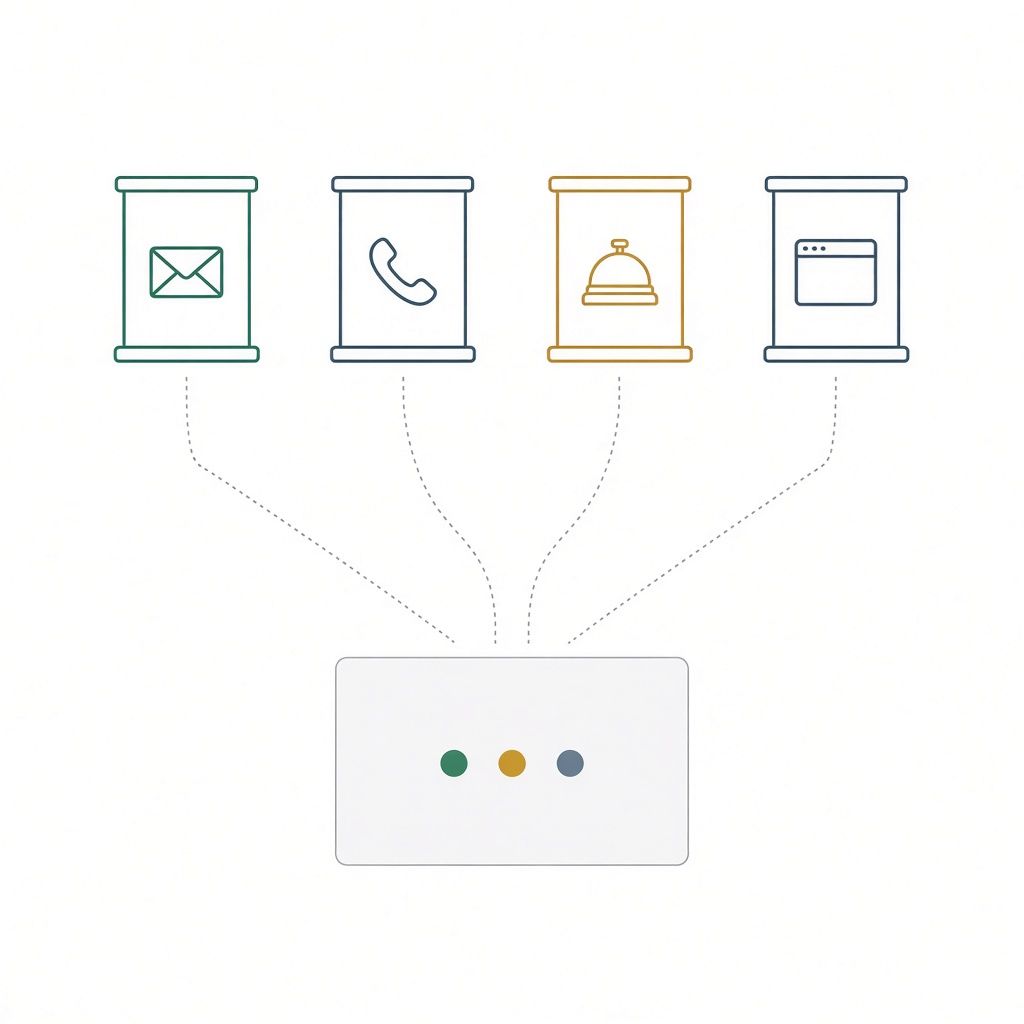
The situations that justify one
Two people answer the same customers
The moment a second person starts replying, "I thought you had that" becomes the ordinary failure. A ticket is the agreement about who has the request. A shared inbox only shows that someone, at some point, opened the mail.
Try it in the check: set people to 2 and leave everything else as a tidy solo inbox. The answer changes on that one field.
Requests arrive through more than one door
Customers write to a named person, to info@, and sometimes they call. Employees stop by a desk. A form on the website creates another copy of the same ask. If the answer depends on which door the request used, the company already has a routing problem. A queue gives every door the same record.
You cannot count the open work
Someone asks how many requests are waiting. The honest answer is a guess. A queue with statuses is how you stop guessing. Backlog, age, and owner are visible because each request is a row, not a message buried under newer mail.
The same question comes back because the last answer is gone
The customer repeats themselves. The next person investigates from scratch. The expensive part is the second and third handling of work the company already did. A ticket keeps the earlier reply, the attachment, and the decision on the same record.
You owe a response time
A contract, a citizen charter, an internal service target, or a regulator expects you to show that a request arrived at 09:12 and was answered at 11:40. A mailbox timestamp is a weak record. It does not show who accepted the work, whether it waited over a weekend, or whether the answer went out. A ticket is that record.
The work crosses teams
IT, facilities, HR, finance operations, or an external supplier all touch the same request. Forwarded mail loses the original ask and the clock. A ticket can move to the next team and keep the history with it.
The queue lives in one person's inbox
Holiday, illness, or a resignation takes the open promises with them. If customers are waiting on mail that only one employee can see, the company has a person, not a process. A ticket queue stays with the role.
You are about to hire into support
The week before the second or third support hire is the cheap moment. The new person can work from the record. After a backlog has piled up in personal mail, you buy the software and then pay people to reconstruct history that was never written down.
The work repeats
Access requests, onboarding, password resets, "the printer on floor 2", invoice copies. These are types of work, not unique conversations. A ticket with a type shows which kind of request dominates the week. That is the first useful input for staffing and for a short knowledge article.
Someone may ask what happened
Public bodies, clinics, laboratories, manufacturers with quality records, and any team that handles personal data and must explain a decision later need a trail: who received it, who changed it, when it closed. The requirement is the trail. The brand of helpdesk is secondary.
A test you can run this month
The interactive check is this table, filled in with your numbers. One failing row is enough. You do not need all of them.
| If this is true | What to do |
|---|---|
| One person owns one inbox, empties it, and no response time is promised | Stay on the inbox |
| Two or more people touch the same requests | Move those requests into a ticket system |
| You cannot list open requests and owners in five minutes | Move those requests into a ticket system |
| A missed reply already cost a customer, a complaint, or a finding | You are late; start with the requests that failed |
| You will hire someone into support | Put the queue in place before they start |
| Requests cross teams or a supplier | One ticket, handed on, with the history kept |
| You must prove when something was received and closed | Tickets are the record |
| The owner is away for a week and the mail waits | The queue belongs to the role, not the person |
| Three or more doors, or the inbox is only mostly emptied | Set the queue up before that becomes the normal week |
Two illustrations you can type in, or load with the example buttons:
| Solo founder | Shared IT queue | |
|---|---|---|
| People | 1 | 4 |
| Emails / week | 12 | 70 |
| Calls / week | 3 | 18 |
| Doors | Email and phone | Email, phone, walk-up, chat |
| Emptied the same day | Yes | Mostly |
| Open work listable in five minutes | Yes | No |
| Promised response time | No | No |
| Crosses a team | No | Yes |
| About to hire | No | Yes |
| A miss already cost something | No | No |
| Work waits when the owner is away | No | Yes |
| Answer | Stay on the inbox | You are already late |
The shared queue is late because the open work cannot be listed, more than one person touches it, and the work waits. The volume explains the week. It is not, by itself, the reason.
Who this describes
- Internal IT, once employees stop walking up to "the IT person" and the same requests arrive by mail, chat, and the hallway.
- Customer support, once volume or headcount makes a personal inbox unfair to the customer who wrote second.
- Shared services — HR, facilities, finance operations — wherever several departments send work to a small team.
- Managed service providers, because the customer will ask for the ticket number and the time it spent open.
- Towns, universities, hospitals, and similar organizations that owe a traceable answer and cannot treat citizen or patient-adjacent mail as someone's private inbox.
- Any team whose product is a promise to respond, including a software company with a support address.
A solo founder with a few clients and an inbox they clear the same day is outside this list. So is a small firm where one person truly owns all external mail and nothing is timed by contract.
When a shared inbox is still enough
Buying a system so the company "looks professional", while nobody has agreed who owns the queue, adds a login and no discipline. The software records an ownership decision. It does not make one.
Stay on the mailbox while all of these hold:
- one person is the owner,
- they empty it,
- requests do not cross teams,
- a week away does not leave customers waiting in a mailbox only that person can see,
- and you have not promised a response time you would have to prove.
Revisit the decision when a second person starts answering, or when the owner is away and the mail waits.
What to switch on first
Start with the requests you already fail. One queue. One owner per item. Three statuses: new, in progress, done. Keep the channel you already use, which is usually email.
| Status | Meaning on day one |
|---|---|
| New | Arrived, nobody has accepted it |
| In progress | A named person has it |
| Done | The answer went out, and the record still shows what was said |
Run that for a few weeks. The tickets will show the next gap: a missing type, a team handoff, a response target, a short article for the question that arrives every day. Add a portal, service targets, a knowledge base, or routing rules after that evidence exists.
A catalog of twelve queues, approval chains, and dashboards on the first Monday is how teams abandon the tool and go back to chat. The queue they needed was smaller than the product tour.
What changes once it is in place
You can see backlog and age. A shift can be handed over. A new hire reads the record instead of collecting folklore. Repeat types become visible, so the team can staff them and write them down.
Routing rules and classification can sort that queue later. None of that exists while the work still lives in personal mail.
The decision
Get a ticket system when shared ownership, several channels, a response promise, a cross-team handoff, or a coming hire makes "we will remember" false. Keep the shared inbox while one person still handles a small number of requests and can prove it by emptying the mailbox.
The trigger is whether an open request can be lost without anyone noticing.
When the check says to move, the open-source ticket systems in this directory are the next page, and the comparisons put two systems side by side. The check itself stays vendor-neutral: it decides whether you need a queue, not which product should run it.